Trying to figure out how to find an H1 tag on a webpage? Well then, you’re at just the right place. We’re Galaxy Growth Media, located at The Woodlands, Texas, and we are experts in web design and local SEO for local businesses.
Understanding technical SEO, web design, or even web hosting may seem like a monumental task. But, worry not.
Want free resources to grow your service business?
Join thousands of other business owners and get the best marketing tips and insights delivered straight to your inbox.
ENTER YOUR EMAIL BELOW:
We’ll show you how to find it (if there is one) and why it’s a big deal for getting your site to rank well on search engines. Ready to jump into the HTML world and boost your website’s online presence? Let’s get started!
What is an H1 Tag and Why is it Important?
An H1 tag is an HTML element that represents the main heading on a webpage. It is typically the largest and most prominent heading on a page and is used to define the topic or main subject of the content. The H1 tag is important for several reasons:
- SEO Optimization: Search engines consider the text within H1 tags to be highly relevant to the page’s content. Including relevant keywords in the H1 tag can improve the page’s visibility and ranking in search engine results.
- User Experience: The H1 tag helps users quickly understand the main topic of the page. It provides a clear and concise heading that grabs the user’s attention and sets the context for the content that follows.
- Accessibility: Screen readers and other assistive technologies use the H1 tag to navigate and summarize the content of a webpage. Properly structured H1 tags can improve accessibility for users with disabilities.
In the next section, we will discuss why finding an H1 tag on a page is essential and explore different methods to locate it.
Why is Finding an H1 Tag on a Page Essential?
The H1 tag is an important element of a webpage’s structure and plays a crucial role in search engine optimization (SEO) and user experience. Here are a few reasons why finding an H1 tag on a page is essential.
Let’s say you are rebuilding your website – or starting one from scratch. You created the most beautiful design and…. month’s later and there’s still no traffic. So you read a little about SEO and realize that amidst all the visual flair, you might have missed out on something fundamental – the H1 tag. This is more than just a piece of code; it’s a key player in how search engines and users understand your website.
The H1 tag is an important element that impacts both SEO and user experience. It should accurately represent the main topic of the page and be optimized with relevant keywords to improve visibility and provide a better browsing experience for users. If you aren’t using a visual editor – being able to spot is is key.
Methods to Find an H1 Tag on a Webpage
If you’re wondering how to find an H1 tag on a webpage, here are a few methods you can try:

- Using Browser Inspector: Most modern web browsers offer developer tools that allow you to inspect the HTML structure of a webpage. Simply right-click on the desired element on the page and select “Inspect” or “Inspect Element.” This will open the browser inspector, where you can view the HTML code. Look for the opening and closing tags of the H1 element to identify the H1 tag on the page.
- Using SEO Tools: There are various SEO tools available that can analyze a webpage and provide insights into its structure and elements. Some of these tools allow you to specifically find the H1 tag on a page. Simply enter the URL of the webpage into the tool and look for the H1 tag in the generated analysis or report.
By using these methods, you can easily find the H1 tag on a webpage. It is important to ensure that the H1 tag accurately represents the main heading of the page and is optimized for search engines and users. In the next section, we will discuss best practices for optimizing H1 tags to improve the visibility and relevancy of your content.
Using the Browser Inspector to Locate an H1 Tag
Finding an H1 tag on a webpage can be done using the browser inspector tool. The browser inspector allows you to view the HTML structure of a webpage and identify specific elements, including the H1 tag. Here are the steps to locate an H1 tag using the browser inspector:
- Right-click on the desired webpage and select “Inspect” or press “Ctrl+Shift+I” (Windows) or “Cmd+Option+I” (Mac) to open the browser inspector.
- In the inspector window, you will see the HTML structure of the webpage. Look for the “Elements” or “DOM” tab.
- Scroll through the HTML code until you find the section where the content of the webpage is located.
- Within that section, look for the opening and closing tags of the H1 element. It will usually be denoted as <h1> and </h1>.
- Once you’ve located the H1 tag, you can click on it in the inspector to highlight it on the webpage.
You can also search for it by pressing “Ctrl+F” which will open up the search bar near the bottom of the inspector window – and then type ‘h1’ (without the quotes.)
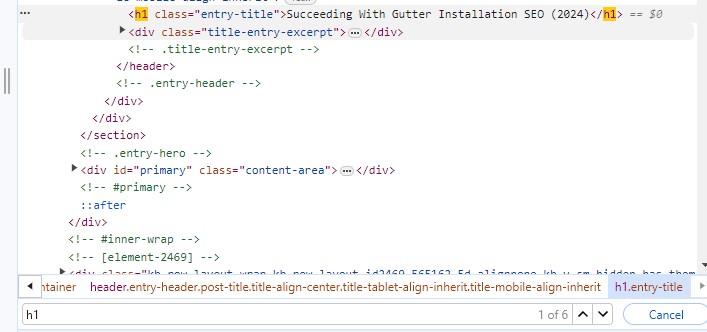
Using the browser inspector is a useful method for quickly finding the H1 tag on a webpage. It allows you to understand the structure of the page and identify important heading elements for SEO and accessibility purposes.
Using SEO Tools to Find an H1 Tag
When it comes to optimizing a webpage for search engines, it is important to identify and utilize the H1 tag effectively. The H1 tag is a HTML element that represents the main heading of a page. It helps search engines understand the primary topic of the content and improves the page’s visibility in search results. Here are some methods and SEO tools that can help you find and optimize the H1 tag on a webpage:
- Page Source Analysis: View the page source code to locate the H1 tag. Look for the <h1> HTML element and check its content to ensure it accurately reflects the main topic of the page.
- SEO Crawlers: Utilize SEO crawling tools like Screaming Frog or SEMrush to analyze the structure and elements of a webpage. These tools can help you identify the H1 tag and evaluate its relevance to the page’s content.
- Content Management Systems: If you are using a content management system (CMS) like WordPress or Joomla, you can usually find the H1 tag within the page editor. Look for options like “Heading 1” or “Page Title” to set the H1 tag.
- SEO Plugins: If you have installed an SEO plugin on your website, such as Yoast SEO or All in One SEO Pack, these plugins often provide a specific section to set and optimize the H1 tag. Use the plugin interface to input your desired H1 tag and ensure it aligns with the page content.
- HTML Validators: HTML validators like W3C Markup Validation Service can highlight any errors or issues with your H1 tag. Running your webpage through these validators can help ensure proper implementation and adherence to HTML standards.
By utilizing these methods and tools, you can easily locate and optimize the H1 tag on your webpage to improve its search engine visibility and effectively communicate the main topic to both search engines and users.
Best Practices for Optimizing H1 Tags
The H1 tag is an important element for on-page SEO optimization. It not only helps search engines understand the main topic of your page but also improves accessibility for users. Follow these best practices to optimize your H1 tags effectively:
- Use a single H1 tag per page: Each page should have one unique and descriptive H1 tag that accurately represents the page content.
- Include relevant keywords: Incorporate targeted keywords within the H1 tag to improve its SEO relevance.
- Make it concise and descriptive: Keep the H1 tag clear and concise, summarizing the main topic of the page in a few words.
- Ensure it matches the page content: Make sure the H1 tag aligns with the actual content on the page, providing an accurate representation.
- Use proper HTML markup: Wrap the H1 tag in the <h1> HTML tag to indicate its significance to search engines and assistive technologies.
- Avoid over-optimization: While keywords are important, avoid keyword stuffing or using irrelevant and excessive keywords in the H1 tag. Focus on providing valuable and informative content.
- Consider the user experience: Ensure the H1 tag is user-friendly and helps visitors easily understand the page topic and purpose.
- Keep it visible and prominent: Place the H1 tag near the top of the page and use appropriate formatting, such as larger font size or styling, to make it visually stand out.
By following these best practices, you can effectively optimize your H1 tags and improve the visibility and relevance of your web pages for search engines and users alike.
Why Should You Have Just One H1 Tag?
Think of each page on your site like a book chapter, with the H1 as the chapter title. It should be unique and give a clear, concise summary of what the page is about. We’ve noticed that some folks, especially those who are just starting out with their own website designs, fall into the trap of using multiple H1 tags. Often, it’s because the default style for an H1 tag makes text look big and bold, and they’re after that visual impact rather than considering the SEO implications.
But here’s the deal: using more than one H1 can confuse search engines about what your page is really focusing on, which might dilute your SEO efforts. Plus, from a design perspective, there are better ways to make your text stand out without compromising the structure and hierarchy of your page content. CSS (Cascading Style Sheets) is your friend here, allowing you to style your headings however you like, keeping your H1s clear for their main job – leading the charge in representing your page’s content.
Conclusion
In conclusion, understanding the importance of H1 tags and knowing how to find them on a webpage is crucial for effective search engine optimization. H1 tags play a vital role in conveying the main topic or focus of a webpage to search engines, helping to improve visibility and rankings. By optimizing H1 tags and following best practices, website owners can enhance their chances of attracting more organic traffic and improving their overall SEO efforts.
At Galaxy Growth Media, we specialize in web design and local SEO services for local service businesses. Our team of experts understands the importance of H1 tags and can help you optimize them on your website to achieve better search engine rankings. Contact us at 917-364-6832 or email us at info@galaxygrowthmedia.com to learn more about our services and how we can assist you in your SEO and web design needs.
Quick Links